Access Your Mac and Agents Anywhere in 15 Minutes
Note: This is expanded from my original tweet.
Agents run. You prompt. There is no need to type code line by line. The loop tightens. With this free setup, you can do it from anywhere – in a car line, waiting for your ride, or even in the shower.
Contents
- Level 1: Access Your Mac Anywhere
- Next Level: Continuous Flow
- Level 2.1: Agent Notifications
- Level 3: Push Notifications
- Level 4: Preview Your Code
- Bonus Levels
Level 1: Access Your Mac Anywhere
Here is the simplest free setup to get this, and this should only take you 15 minutes:
- Tailscale for VPN and security. Install on both your phone and Mac.
- Termius for terminal access with a nice keyboard bar. Install on your phone.
- Have your Mac always connected to power with the lid up.
- Grab your Mac's Tailscale IP from the Tailscale app on your phone.
- Enable Remote Login in macOS System Settings/Preferences → Sharing so SSH is allowed.
- Connect via SSH to that IP in Termius.
Now you can vibe from your phone anywhere.
Next Level: Continuous Flow
What if you want to start your work from your Mac and continue on from your phone? Introducing tmux:
- Just define a bash function
aain your.zshrc:aa(){ tmux new -A -s work} - When you connect, type
aato connect or start the session. - You can also start or reattach to the session from your Mac if you have ongoing agent work.
Want your tmux to be prettier? Just do this:
just typed your tweet into my agent and asked it repro it, and it did, since i haven't used tmux for many years and it's pristine setup, it also taught me how to create panels and setup meta key.
— shao (@randomor) January 3, 2026
i don't need your dotfiles, all i need is your ideas, thanks for sharing! pic.twitter.com/yI7QhkfCpu
Not sure how to navigate with tmux windows/panels or remember all the key bindings?
- You can just use one window/panel.
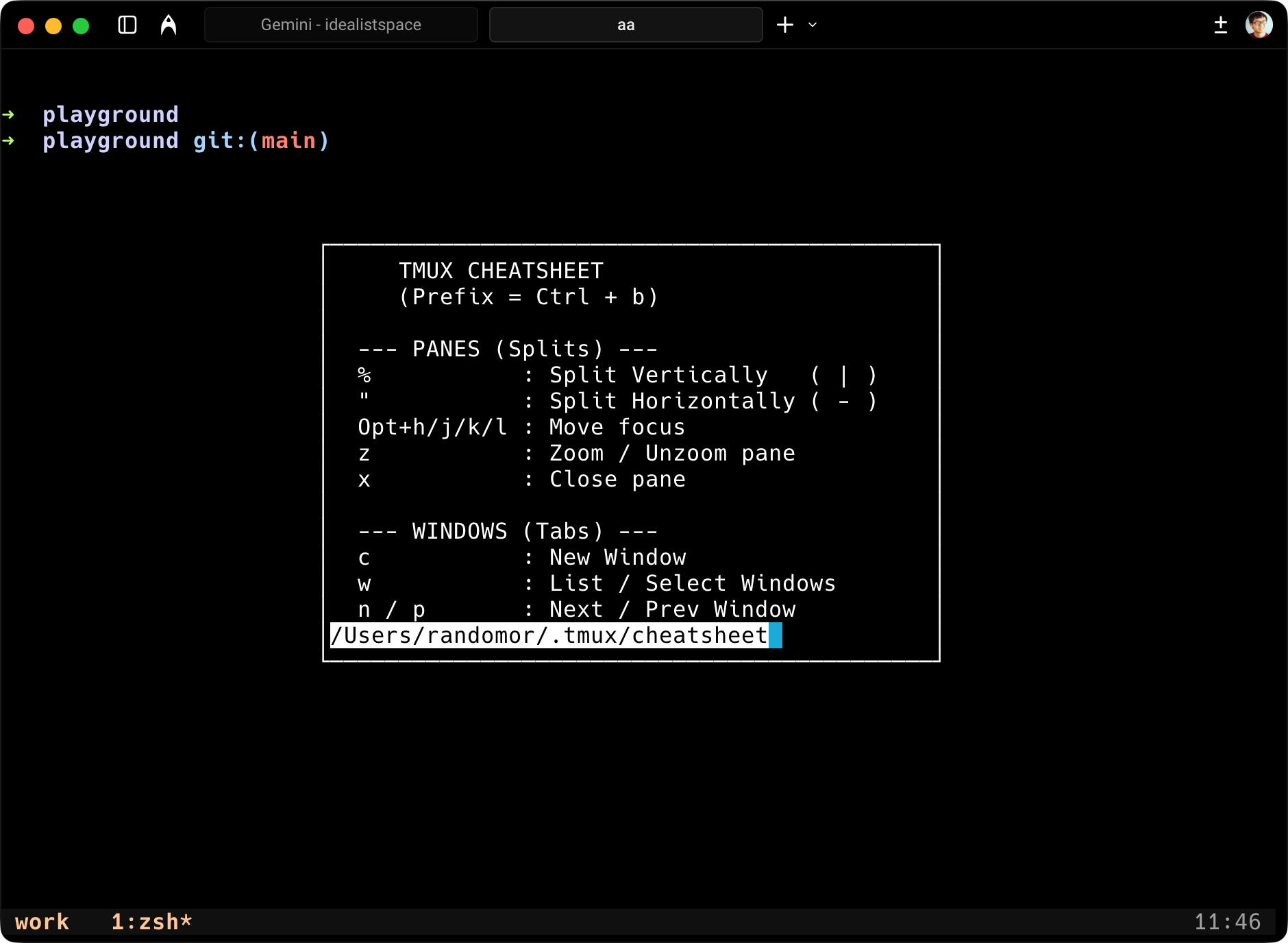
- Or, you can ask your agent to put all common shortcuts in an info panel and hook it up to
ctrl + b + i, so you only have to remember that one.
Level 2.1: Agent Notifications
Want to be notified when your agent needs your attention?
- Ask your agent to always "emit a terminal bell (
printf '\a')" in yourhttp://agents.mdwhen they need your attention or are close to being done.
Level 3: Push Notifications
Just ask Agents.md to run a script that calls a private Discord channel webhook as above. It's all free. No $500/month Poke or $100/month VM needed.
Level 4: Preview Your Code
For Web Apps:
- Run your app
npm run dev(which may start a server at localhost:8080). - Go to the Tailscale app, copy the MagicDNS link.
- You will get a link like
yourmac.tailabcd.ts.net. - Just append the port to the MagicDNS link (e.g.,
yourmac.tailabcd.ts.net:8080). - Now you can preview anywhere.
For iOS Apps:
- Push the TestFlight to preview (follow my workflow here).
- Or, if you are in the same home WiFi, you can ask your agent to build your project, it will run on your iPhone directly (won't work outside of WiFi unfortunately).
Bonus Levels
- 5x Input Bandwidth: Want to 5x the input bandwidth instead of just 2 fingers? Buy this keyboard:
I declare this as the best keyboard for @daylightco and @thezenjournal….
— shao (@randomor) January 5, 2026
I can finally fire with all ten fingers. Perfect for my new vibe coding setup as well… pic.twitter.com/tQq7mrZhCo
- 1.2x Typing Speed: Want to type 1.2x faster with a physical keyboard, or simply want to type in bed (i'd not recommend unless you want to mess up your sleep), or in the shower (which I do recommend, like what's stopping you)? Buy the new fancy Clicks keyboard. Don't expect significant speed up though, as you have to learn new muscle memory and you still have to type with your thumb.
Termius has claimed the top of my screen time list even with my Mac usage over the weekend. It probably will not last, but I like the option of having it available.